
AutoCount: e-Invoice: How to check e-Invoice submission change log?
AutoCount:如何查看电子发票提交变更记录

English article
Question
After editing and resubmitting an e-Invoice, how can I check the e-Invoice submission change log?
Answer
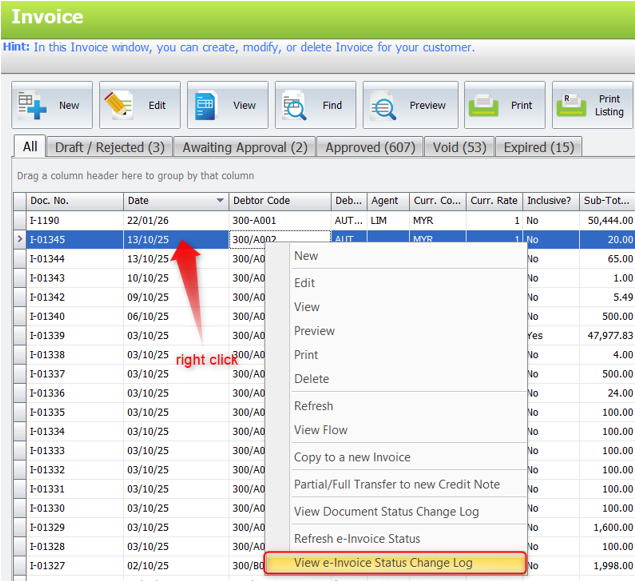
Right click on the document and select View e-Invoice Status Change Log.
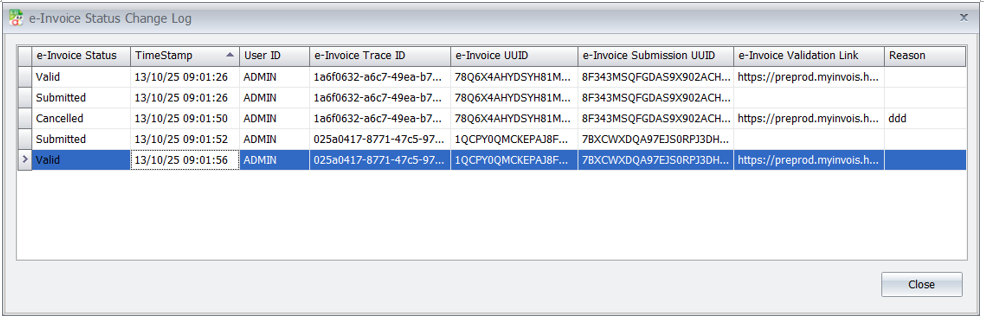
Here, you can view all status changes (e-Invoice Status), along with timestamp, UserID, e-Invoice Trace ID, e-Invoice UUID, e-Invoice Submission UUID, e-Invoice Validation Link, and Reason.
Source: AutoCount Wiki · By: Lay Swan 251013
中文内容
问题
编辑并重新提交电子发票后,如何查看电子发票提交的变更记录(change log)?
解答
右键点击单据,然后选择 View e-Invoice Status Change Log(查看电子发票状态变更记录)。
在这里,您可以查看所有的状态变更(e-Invoice Status 电子发票状态),以及时间戳(timestamp)、UserID、e-Invoice Trace ID、e-Invoice UUID、e-Invoice Submission UUID、e-Invoice Validation Link 和 Reason(原因)。
来源:AutoCount 官方 Wiki · 作者:Lay Swan 251013
MyTax Info
More practical e-Invoice updates